Ubiquitous accessibility: are we there yet?
Case Study of Web Accessibility Audit
Replicating · Billah et al. CHI 2017
Summary
Software still breaks for blind users after every update. The workaround falls on them, not the product team. We wanted to understand exactly why nothing had changed in 8 years.

We set out to answer three questions. A 10-week replication with legally blind users, grounded in 12 peer-reviewed sources, surfaced four design insights for a product team.
This research directly changed how I think about the missing feedback status and invisible dynamic updates in my product work.
Screen readers
UX research
Inclusive design
Replication study
Qualitative methods
Participants
4
legally blind
ages 32–76
Interviews
~3 hrs
semi-structured
recorded
My role
Co-lead
team of 4
Design insights
4
actionable
Themes
3
hybrid coding
Tools
4
Dovetail
FigJam
Zoom
JAWS (for testing)
Methods
4
Semi-structured interviews
hybrid inductive/deductive coding
affinity mapping
Why
Where ubiquitous accessibility breaks down
The problem, in one flow
Software update
OS, app or browser
Screen reader breaks
Crash, lag, lost commands
User carries load
Relearn, switch, troubleshoot
Loss
Time & equity
Software updates are routine for sighted users. For screen reader users, they're a recurring rupture and the cost lands on the people they were meant to serve.
Three questions we set out to answer
How do screen reader users experience software updates today?
Do the disruptions documented in 2017 still happen?
What strategies do they use to adapt?
Where does the burden of accessibility actually fall?
Process & key decisions
10 weeks, 4 phases, accessibility-first throughout
Standard usability research templates don't apply when the testing tool is also the assistive tool under study. Four phases, four process refinements.
1
Scope
Partial replication
Decision
Interview portiononly, not full
2
Logistics
A11y-first protocol
Decision
Pre-test consentwith screen readers
3
Collect
4 Zoom interviews
Decision
Verbal, recorded consent up front
4
Analyze
Hybrid coding
Decision
Inductive + deductive.
Inductive surfaced what's new in 2025; deductive anchored back to the 2017 frame
Our coding workflow
2017 vs 2025: a qualitative comparison
Based on participant accounts across both studies. Not a quantitative measure.
Dimension
2017 (Billah et al.)
2025 (this study)
Updates disrupting workflows
Frequent
Frequent
Evidence
(P2): "When the EPIC system was upgraded, it worked all the time. So sometimes when they do upgrade, it does affect JAWS in a way that JAWS does not always recognize everything on that screen." | (P3): "When it updated the Excel spreadsheet it froze and I couldn't find any cases."
Burden of adaptation on user
High
High
Evidence
(P1): "I don't really read what the update is or what changed… you have to read all the documentation or go to training modules… a lot of us just wait to see if it's interfering with something, then we look into it."
Job loss tied to updates
Reported
Not found
Evidence
2017: "Eight participants expressed concerns about job security… some users lost their jobs after struggling to adapt." (Billah et al.) | 2025: No participant in our sample reported quitting or losing work over a screen reader update.
Workplace support & flexibility
Limited
Improved
Evidence
(P2), reported in the final paper: "My boss told me basically because me being a JAWS user, I am allowed more time. He said, 'you're doing a great job being a JAWS user.'" (Note: also reflects the tension, she wanted equal standards, not extra time.)
Accessible IT & tech support
Inconsistent
More available
Evidence
(P2): "When I spoke with IT, they just basically told me it's a hit or miss… usually it helps us, usually a help desk." | participant notes: Illinois Dept. of Rehab Services installed JAWS on her workplace PC.
User-built backup systems
Implied
Sophisticated
Evidence
(P1): "You have to have backup plans, you know? For any devices, I think." | (P3): "NVDA… that one I use just in case JAWS crashes." | (P4) notes: "switch between screen readers, JAWS and NVDA."
"
"NVDA nonvisual desktop access um that one I use just in case JAWS crashes." - participant
"
"You have to have backup plans, you know? For any devices, I think, in my opinion." - participant
The insight
Screen reader users have built mental models that anticipate failure. They keep backup devices & tools not because they want to but because the system has taught them to expect breakage.
Workplaces have improved. The tools haven't kept up.
What kinds of backup did users keep?
Not one backup but layered, task-specific redundancy across four categories.
Alternative screen readers
When the primary fails:
JAWS → NVDA (free fallback)
JAWS → Narrator (when on a foreign computer)
JAWS → VoiceOver (on iPhone)
"NVDA, that one I use just in case JAWS crashes." -(P3)
Cross-device redundancy
Different device for different task:
Laptop - long-form writing, email
iPhone - texts, calls, dictation, navigation
Meta glasses - visual descriptions
"If I don't have my laptop with me, my iPhone becomes more valuable." - (P1)
Specialized assistive devices
Purpose-built standalone tools:
Victor Reader Stream (talking books)
Victor Reader Tracker (GPS)
Talking clock (reliable, no updates)
Slate & stylus (manual braille)
"A really old talking clock… very reliable." - (P1)
Supplementary apps & humans
When tech fails entirely:
Be My Eyes (live sighted help)
Aira Explorer (paid visual help)
Seeing AI (object/text recognition)
Voice Vista, Apple Maps (overlap)
A sighted spouse or colleague
"Quickly find somebody… hey, what is it saying here?" - (P2)
What we found
After hybrid coding, inductive first to surface what's new, then deductive against the 2017 framework, four findings emerged. Two confirmed the original study. Two were new.
Same as 2017
Updates still break workflows
Crashes, lag, lost commands, and broken navigation patterns. Productivity drops while users relearn the new interface.
Same as 2017
The user still carries the load
Documentation is too long or too technical. Users wait until something breaks, then troubleshoot alone or through peer networks.
Emerged New insight
Users have built mental models that expect failure
Backup devices, alternative screen readers, peer-built workarounds. The system has taught users to plan for breakage.
Changed since 2017
Workplaces have evolved
Supportive managements, accessible IT, flexible performance metrics. Participants no longer quit jobs over screen reader breakdowns.
"I only use Narrator when JAWS won't work" - participant
Participant, on living with constant fallback
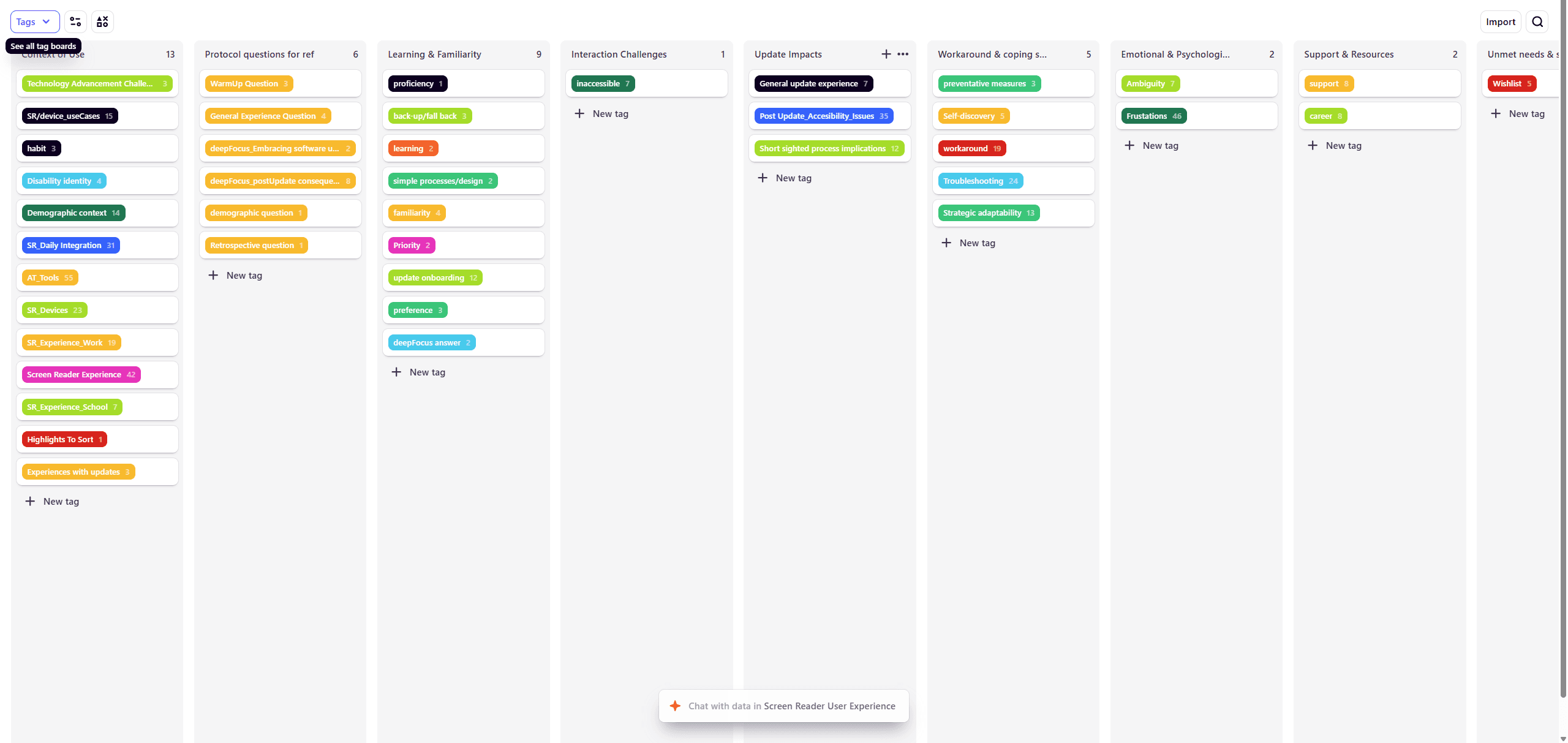
Dovetail

Three themes from the data
Surfaced through inductive coding in Dovetail, refined via affinity mapping in FigJam, then compared against the 2017 Billah et al. framework.

Emerging themes

THEME 01
Software update experiences
Participants chose devices and screen readers based on the task at hand, switching between tools to match needs or work around limitations.
They also kept backup screen readers for when their primary tool broke after an update.
THEME 02
Software update consequences
Two sub-findings emerged.
First, update information was too complex, lengthy, or inaccessible, participants often missed it.
Second, updates produced both gains (security, better voices, broader platform access) and losses (crashes, lag, disrupted workflows, relearning). Workplaces accommodated the lag, but participants resented being held to a different standard.
THEME 03
Troubleshooting practices
All four participants developed self-initiated strategies to manage update-induced issues: restarting devices, relying on sighted individuals, keeping personal troubleshooting notes, calling technical support, searching for fixes online, using alternative screen readers, and practicing new commands during downtime.
They expressed a strong need for faster, more accessible technical support.
From insight to design
Problem
Update notes are too long, too technical, or inaccessible, users missed them entirely.
Design recommendation
A plain-language update summary card, tested with screen reader users before each release.
Problem
Sometimes updates change keystrokes and labelling, forcing users to relearn established workflows.
Design recommendation
A keystroke-stability contract, committed shortcuts that don't change between minor versions.
Problem
When things break post-update, users wait on hold or rely on peer networks for help.
Design recommendation
A post-update support channel that auto-opens for assistive tech users for N-number of hours after a release.
Problem
No way to flag updates that quietly degrade accessibility, no quick and easy way to communicate directly with product teams.
Design recommendation
An in-tool "this update broke X for me" reporter, accessible from any screen.
Each one of the screen-reader users constitutes the entire sample, find a way to leverage the whole user-base like a community.
Role/Ownership
Working in a team of four, here's what I owned and the constraints we navigated together
What I owned
Consent form & accessibility audit, authored the consent PDF, tagged it for screen readers, and tested with JAWS before distribution (see audit below)
Field interview, conducted interviews with participant, whose consent-flow struggle became a study-shaping moment
Team collaboration
Scope pivot: co-led the call to shift from a solution-oriented design study to a pre-design replication, given the 10-week timeline and recruitment constraints
Interview protocol: co-designed warm-up, deep-focus, and retrospective question arcs aligned to the 2017 study's framework
Coding framework: designed the hybrid inductive/deductive approach so we could both extend 2017 and capture what was new
Synthesis: mapped 4 transcripts into 3 themes and 4 design-actionable insights using FigJam affinity mapping
Constraints & how we adapted
Tool stack shifted mid-study
Planned ATLAS.ti for coding, moved to Dovetail when team access proved smoother. We documented the rationale.
Version variance
different JAWS/NVDA versions per participant; we shifted focus from task completion rate to disruption patterns.
Consent friction we couldn't fix
SharePoint identity verification blocked one participant even though our form was accessible. A reminder that accessibility is a chain
Accessibility built into: Consent Form
Tested for before recruitment opened:
Document language set (en)
Tells the screen reader which pronunciation engine to use. Missing lang attribute is a top WCAG failure on PDFs.
Tagged PDF structure
Without tags, screen readers read the file as one undifferentiated block. Tags let JAWS, VoiceOver, and NVDA navigate by structure.
Document title displayed
DisplayDocTitle flag set, so the screen reader announces the title rather than the filename string.
Title, author, subject metadata
Provides context to the user before they open the document. All four metadata fields populated, not auto-filled defaults.
Team name written as "L I R N"
Spaced letters so screen readers don't pronounce LIRN as a word. Tested with JAWS before distribution.
Email addresses spelled out
Letter-by-letter spelling (R T H A C K E 1) prevents misreading of usernames as words or skipped characters.
DOCX alternative provided
Some participants preferred Word over PDF for screen reader compatibility. P1 noted this directly: "the doc file was much better."
Verbal consent at session start
No e-signature dependency. Removed a layer of screen reader friction that could exclude participants before the study began.

